+44 782 583 7455

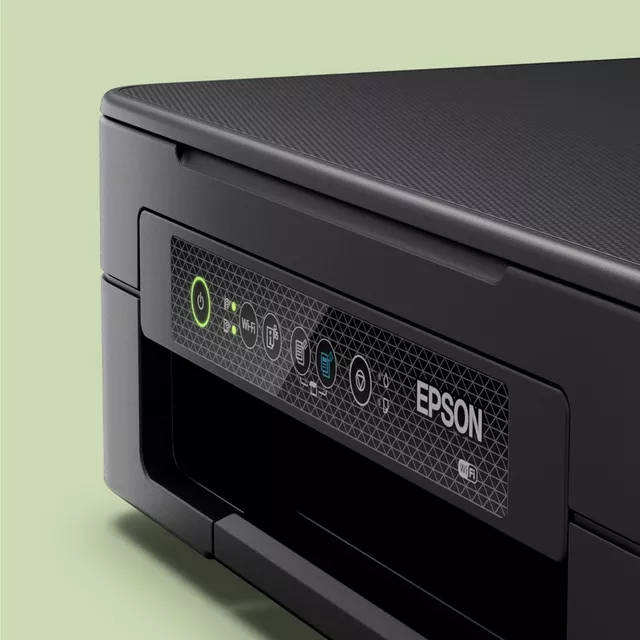
Epson XP-2200 - manufacturer model image. Check your exact printer before choosing ink. View this printer.
The UK Epson XP-2200 uses the 604 cartridge family, with standard and XL options. Choose the correct family first, then compare capacity and pack contents. XL is a capacity choice within that family; it does not make a 603 cartridge suitable for your printer.
Which 604XL pack do you need?
Start with the colours you need. Extra black is additional to the black already included in each full set.
In this guide
What changes between 604 and 604XL?Choosing ink for the XP-2200When does XL offer better value?Original or compatible?Questions before orderingCheck the right rangeFor most buyers, the useful question is how much of each colour they actually use. A larger black cartridge may suit document printing, while buying several complete sets makes less sense if unused colours are already waiting in a drawer.
What changes between 604 and 604XL?
| Check | Standard 604 | 604XL |
|---|---|---|
| Family | Pineapple | Pineapple |
| Main buying distinction | Standard capacity | Higher-capacity option |
| Colour selection | Check each cartridge label | Check each cartridge label |
| Compatibility test | Exact printer listed | Exact printer listed |
| Best value test | Price against comparable yield | Price against comparable yield |
The XL suffix does not promise a sharper document or a different printer feature. It also does not mean every cartridge in a multipack is XL. Read the black and colour specifications individually, particularly where an offer combines high-capacity black with standard colours.
Epson's original figures belong to Epson cartridges and their stated test conditions. A compatible product needs its own capacity and yield specification. Do not transfer an original-cartridge page count into a compatible comparison simply because both labels contain 604XL.
How much more ink does 604XL hold?
For Epson original single cartridges listed for the UK XP-2200, standard 604 black contains 3.4 ml and 604XL black contains 8.9 ml. The individual cyan, magenta and yellow cartridges are 2.4 ml in standard 604 and 4 ml in 604XL. These are original Epson specifications checked on 27 October 2026; compatible cartridges have their own stated capacities.
Compare the exact cartridge or pack you are buying. Epson's listings can show different declared black yields for an individual cartridge and a multipack, so there is no useful single page-count multiplier to apply to every 604XL offer. Capacity in millilitres is also not a guarantee of the number of pages you will print.
Choosing ink for the XP-2200
Start at the XP-2200 printer page. Check the model on the printer itself, especially if it was imported or bought second-hand. A search result for a similar XP number is not a substitute for this check.
The everyday choice is between replacing the colour the printer requests and replenishing all four colours. A full four-colour set contains black, cyan, magenta and yellow. Two sets mean two of each; a set plus extra black has a different balance. Compare the written quantities rather than the size of the product photograph.
If black is the only colour running low, a suitable single black cartridge can avoid unnecessary colour purchases. If all colours are low, a set may be more convenient. Neither decision requires replacing working cartridges solely to make every cartridge the same capacity.
When does XL offer better value?
Use the delivered price and a comparable declared yield for the exact cartridge. The lower shelf price is not automatically the lower running cost. Equally, a larger cartridge is not automatically the better purchase if it will sit unused or you expect to replace the printer soon.
A fair comparison holds the colour, brand type and test basis constant. Comparing a compatible XL black with an original standard four-colour set answers two different questions at once. First compare black against black, then consider whether you need the other colours.
Our multipack comparison guide explains why cartridge count alone can mislead. Treat a pack with additional black as extra black capacity, not as another complete colour set.
Which 604XL pack matches your printing?
| Your usage | Pack to compare | What it contains |
|---|---|---|
| All four colours need replacing | One full set | 1 black, 1 cyan, 1 magenta, 1 yellow: 4 cartridges |
| Mostly documents, with occasional colour | A full set plus extra black | Read the extra-black quantity: it is additional to the black in the set |
| Regular printing in every colour | Two full sets | 2 black, 2 cyan, 2 magenta, 2 yellow: 8 cartridges |
| Regular colour printing and more black documents | Two sets plus two extra black | 4 black, 2 cyan, 2 magenta, 2 yellow: 10 cartridges |
For example, a ten-cartridge pack described as two sets plus two extra black is not ten complete sets. Check the quantities against the colours you use, then compare the current delivered price on the product page.
A simple cost-per-page comparison
Divide the price of one cartridge by its comparable declared yield. As a calculation example only, a black cartridge costing £10 with a declared yield of 200 pages works out at 5p per page; £15 for 500 pages works out at 3p per page. These are illustrative figures, not prices or yields for an Ink-Prints product. For a multipack, compare equivalent colour contents rather than adding black and colour yields together.
Original or compatible?
Original Epson and compatible cartridges are separate product types. Check the exact printer support, installation guidance and current compatibility advice on the product you choose. A compatible label does not guarantee operation with every firmware version.
Look at the four-colour compatible 604XL offer for its own declared contents. Use the live page for price and availability; these can change independently of this guide.
If a new cartridge is not recognised, record the precise error and the affected colour. Repeated head cleaning does not solve an electronic recognition error. Use the recognition troubleshooting guide or contact us with the model and photographs before opening more cartridges.
Questions before ordering
Can I buy 603XL instead of 604XL?
No. They are different families. The XL suffix is not a compatibility adaptor; check the printer's listed supplies.
Must I buy all four colours together?
Not simply because one colour runs low. Follow the printer's replacement message and compare a single replacement with a set you genuinely need.
Will XL guarantee the advertised number of pages?
No. Declared yields use specified conditions, while your documents, photographs and maintenance use vary. Compare like-for-like figures rather than treating a page count as a promise.
Is a bigger multipack always cheaper to use?
Only if its contents suit your consumption and its comparable cost is lower. Extra cartridges of a colour you rarely use can add spending without solving the immediate shortage.
Check the right range
Compare the labelled pack contents and current availability in our Epson 604 / Epson 604XL (Pineapple) range. Match your exact printer before ordering; ask us if the model or cartridge code is unclear.
Buying ink for the Epson XP-3200?
Compare matching 604XL sets and exact pack contents for the Epson XP-3200. Standard and XL describe cartridge capacity; extra-black bundles describe the number and colours supplied.