+44 782 583 7455
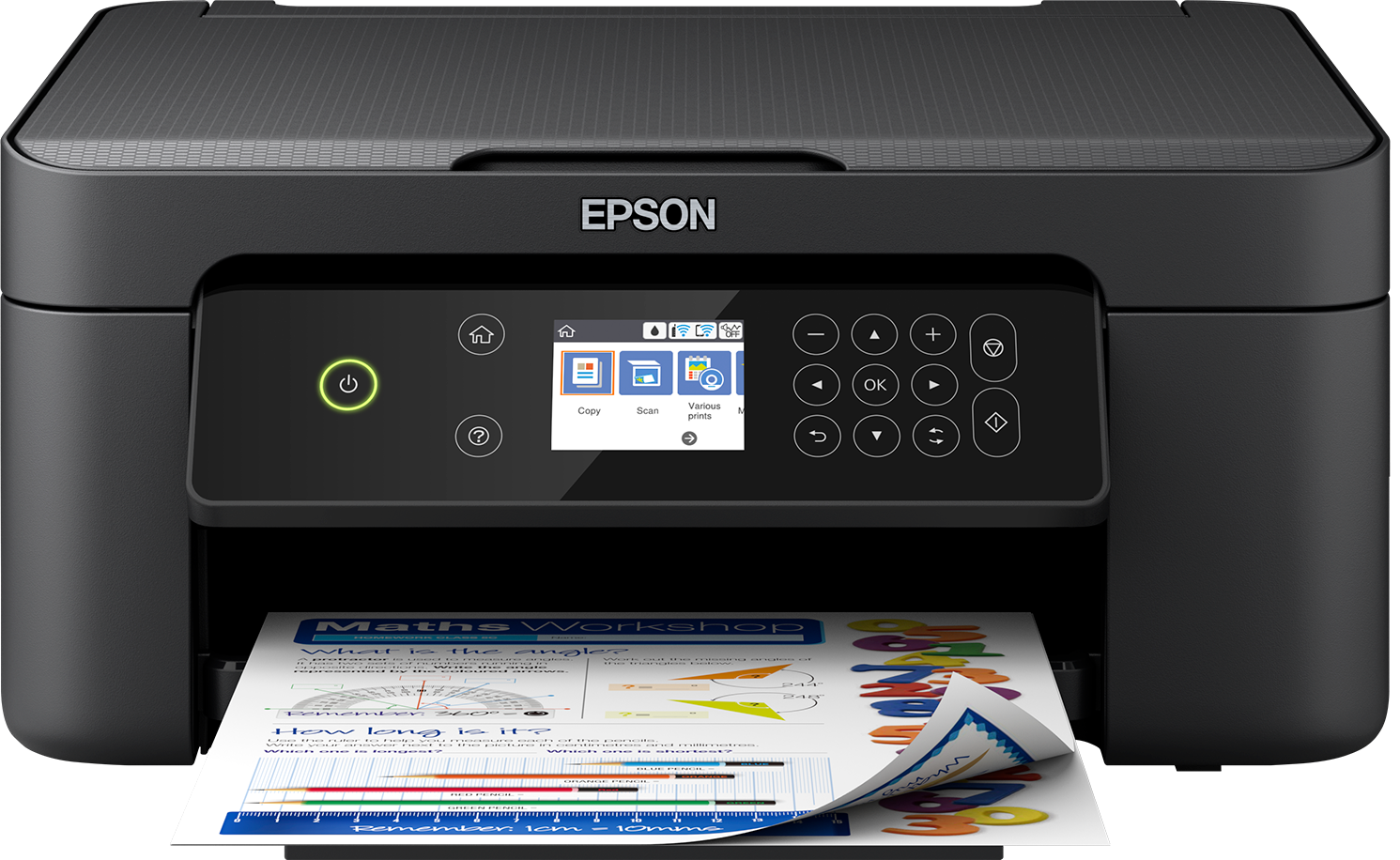
The UK Epson XP-3100 uses the 603 family, with standard and XL options. Confirm that exact model and region, then choose the colours and quantities you need. The higher-capacity suffix does not make a different family, such as 604, suitable.
In this guide
Check the complete modelDecide between 603 and 603XLUnderstand set contentsReplace using the XP-3100 procedureIf print quality is poor afterwardsCheck the right rangeA useful order begins with the printer's current message and the spares you already have. Do not buy another complete set simply because a search result presents it more prominently than the single colour you need.
Check the complete model
Use the label on the machine rather than its appearance or a remembered XP number. The XP-3100 model page provides the UK family route. If the machine was imported, confirm regional supplies through the manufacturer's documentation.
The name Expression Home covers multiple generations and cartridge families. An offer for another XP model is not enough evidence, even where a retailer describes both as home all-in-one printers.
Read the actual cartridge code too. Outer packaging, a marketplace title and an old installed cartridge can disagree, particularly on a second-hand machine with an unresolved error. Where they do, pause rather than choosing whichever number is cheapest.
Decide between 603 and 603XL
| Priority | What to compare |
|---|---|
| Lower initial purchase | Suitable standard-capacity option |
| Regular printing | XL against standard on comparable declared yield |
| Mostly black documents | Black capacity and existing colour supplies |
| Frequent colour printing | All colour quantities, not black alone |
| Printer replacement planned | Realistic ink needed before changing machines |
XL is a capacity choice, not a promise of improved resolution. For a fair cost comparison, use the exact cartridge's delivered price and its own supported yield basis. Epson-original figures should not be borrowed for compatible products.
A large pack can be attractive without being the best fit for you. If cyan and yellow are still waiting unopened while black runs low, compare a black replacement before adding another complete set to the cupboard.
Understand set contents
One four-colour set consists of black, cyan, magenta and yellow. Two complete sets repeat all four. A bundle with extra black changes that balance and should say how many black cartridges are included.
Check the written components of the compatible 603XL set and any larger alternative. Do not calculate savings against an original bundle with different quantities or capacities.
Use current product information for price and stock. A guide cannot guarantee that the product you saw last month is still available, nor that an old search snippet reflects today's pack contents.
Replace using the XP-3100 procedure
Use the printer's documented cartridge-replacement process and screen guidance. Do not move the carriage by hand or apply a button sequence copied from a model with a different panel.
Prepare the supplied replacement as instructed, avoiding unnecessary contact with electrical or ink-contact surfaces. Keep the packaging until the printer accepts it and completes its normal process.
If recognition fails, record the affected colour and exact message. That is a different problem from streaks after a cartridge has been accepted. Use the recognition guide, rather than repeatedly running head cleaning.
If print quality is poor afterwards
Use a model-specific nozzle check before deciding whether cleaning is needed. A normal document, with its application and paper choices, is less precise evidence of which colour channel is missing.
Follow the XP-3100 manual's limits and waiting instructions. Do not assume a cleaning schedule from a different EcoTank or Expression model applies. Keep before-and-after patterns so any improvement can be assessed rather than guessed.
Can I use 604XL instead of 603XL?
No. Choose the family specified for the exact printer. Similar numbering does not establish interchangeability.
Is compatible ink the same as Epson-original?
No. It is a separately supplied replacement with its own specification and current compatibility conditions.
Should I buy a full set for one empty cartridge?
Compare the appropriate single with the set contents you genuinely need. Do not discard usable ink just to make the capacities match.
Will a new cartridge cure every print fault?
No. Settings, paper, nozzles and other conditions can affect output. Diagnose the symptom rather than buying supplies speculatively.
Check the right range
Compare the labelled pack contents and current availability in our Epson 603 / 603XL (Starfish) range. Match your exact printer before ordering; ask us if the model or cartridge code is unclear.