+44 782 583 7455
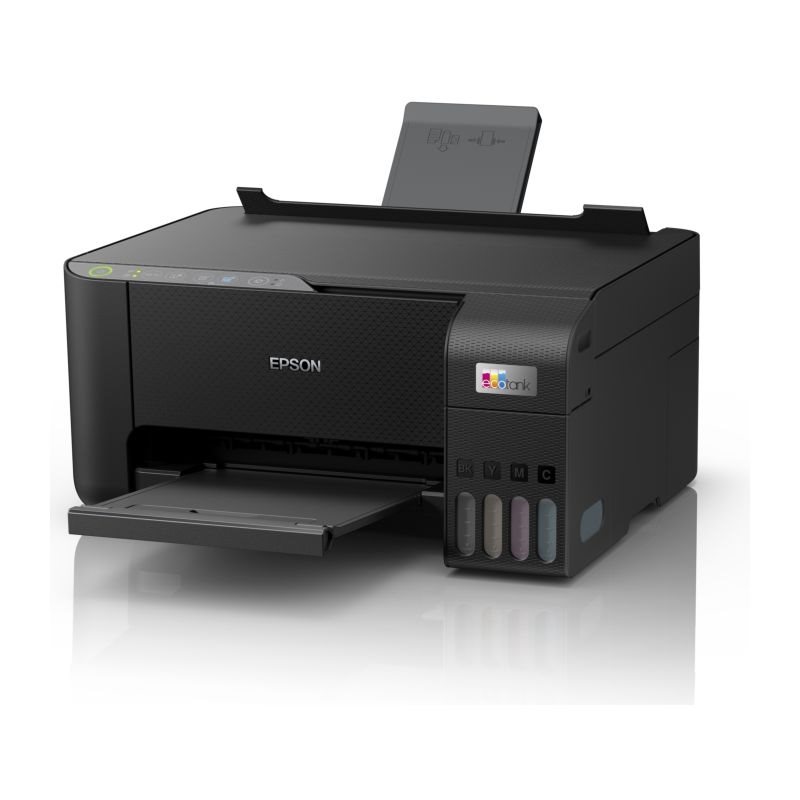
To refill an Epson 104 EcoTank, first confirm the exact printer and bottle series, then match the bottle colour to the labelled tank. Keep the printer level and use the model's filling instructions. Do not squeeze ink in, force a bottle into a port or fill above the marked upper line.
In this guide
Before opening the bottleA careful refill sequenceWhat not to doAfter fillingBuying the right amountCheck the right rangeThe practical example below is based on Epson's ET-2810-series guidance. Another model or a compatible bottle design may have different preparation details, so use its own instructions rather than assuming every EcoTank fills identically.
Before opening the bottle
Check the model on the machine. Our ET-2810 page lists the 104 family for that UK example. Do not assume another similar ET number uses 104; the 102 versus 104 guide explains why the family check matters.
Read the bottle label and the tank colour twice. Protect the work surface, keep children and pets away from the open ink, and have the relevant printer instructions available. Keep the bottle in its original labelled container.
If the bottle does not match the port or the specified family, stop. A modified nozzle, adaptor or syringe does not establish that the ink is suitable.
A careful refill sequence
- Follow the manual to access the tank area safely, with the printer level and in the required operating state.
- Check the visible ink level and identify the correct labelled tank. Open only the tank you are filling.
- Prepare the matching bottle according to its own instructions, keeping the outlet clean and avoiding spills.
- For the supported Epson keyed bottle, align it straight with the matching filling port. Do not squeeze or tilt it to force flow.
- Observe the level. The documented original-bottle process stops at the upper line; do not keep removing and reinserting a bottle once that line has been reached.
- Remove the bottle as instructed, close the tank cap securely and close the printer's covers.
- Follow only the model's documented post-refill prompts. Keep any remaining ink securely capped, upright and stored as specified.
This is not a claim that every compatible cap has identical automatic flow behaviour. If your supplied bottle uses a different mechanism, follow its supported instructions and the printer's level limits. Ask the retailer if the two sets of instructions do not agree.
What not to do
| Temptation | Better response |
|---|---|
| Force a bottle that will not fit | Recheck series, colour and design |
| Squeeze to speed filling | Follow the supported flow method |
| Add ink above the upper line | Stop at the documented limit |
| Repeatedly reinsert at full level | Close and finish the procedure |
| Decant into an unlabelled container | Retain correctly labelled storage |
Do not run the printer below the manual's required level or treat a software indication as the only evidence of tank contents. Use the physical markings as the model instructs.
After filling
A refill and an initial printer setup are different situations. Do not repeat a new-printer charging procedure or reset levels arbitrarily unless the manual specifically calls for it.
If output is poor afterwards, use the supported diagnostic pattern and maintenance route. A full tank does not prove that every nozzle is printing correctly, but it is not a reason to start repeated power cleaning without checking the model's requirements and limits.
If you put the wrong colour or wrong series into a tank, stop printing and contact the manufacturer or a qualified repairer. Do not dilute the mistake with more correct ink, flush the system yourself or keep printing in the hope it will clear.
Buying the right amount
Check whether you need one colour or a four-colour bundle. Additional black does not create another complete set. Internal retailer codes containing XL do not establish a separate official 104XL series; compare the stated bottle code and actual volume.
Use the live offer for current price, quantity and availability. Do not equate a replacement bundle's volume with the advertised ink supplied with a brand-new printer.
Can I refill while the bottle is tilted?
Use the alignment shown for your supported bottle and model. Do not tilt or squeeze to overcome a fit or flow problem.
Should I top up beyond the full line before a large job?
No. Respect the upper limit rather than trying to add a reserve above it.
What if ink does not start flowing?
Follow the manual's checks for that situation; recheck colour and alignment. Do not force flow with pressure or tools.
Can leftover ink be kept?
Follow that bottle's storage and use-after-opening guidance. Keep it securely closed and labelled; there is no universal storage period for all ink products.
Check the right range
Compare the labelled pack contents and current availability in our Epson 104 range. Match your exact printer before ordering; ask us if the model or cartridge code is unclear.